1. Navigate to My Channel, then select the specific channel you want to work on.
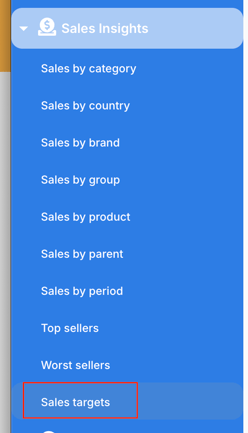
2. For Vendor channels, go to Retail analytics > Revenue targets. For the other channels , go to Sales Insights > Sales targets.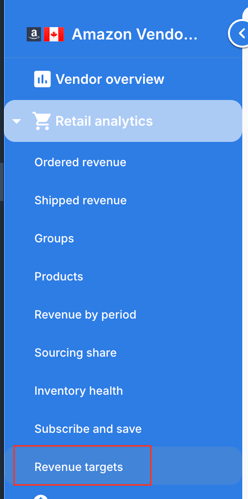
3. Select a date range—this defines the coverage period for your budget/forecast.
Within the targets section, you’ll see three key metrics:
• Sales Budget – Typically used to set a fixed target based on your goals.
• Sales Forecast – Often adjusted regularly to reflect expected performance changes.
• Ad Spend Budget – Used to plan your advertising investment.
To enter values:
• Input the desired amount under the relevant metric.
• Click “Split Evenly” to distribute the total amount evenly across the selected date range.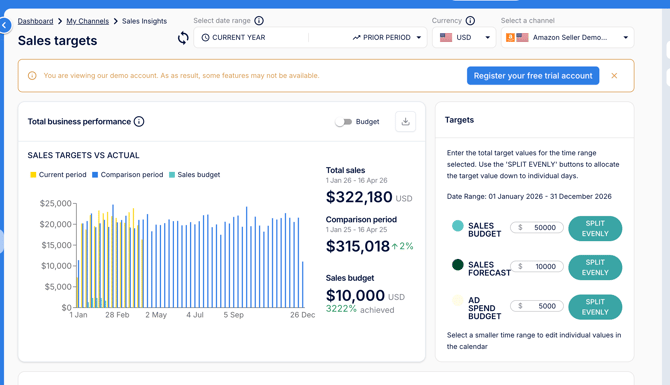
This allows you to quickly allocate targets across a defined period while maintaining flexibility to adjust forecasts as needed.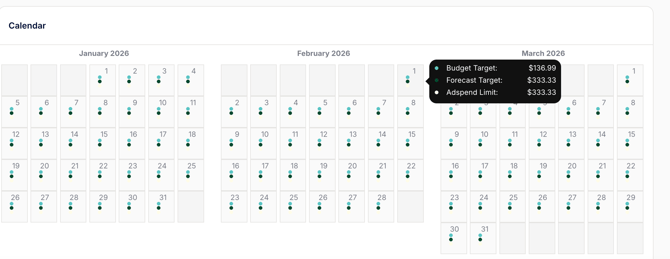
English
![MS_Master_Horizontal_Reversed (1).png]](https://help.merchantspring.io/hs-fs/hubfs/MerchantSpring%20Logos/MS_Master_Horizontal_Reversed%20(1).png?height=30&name=MS_Master_Horizontal_Reversed%20(1).png)