![MS_Master_Horizontal_Reversed (1).png]](https://help.merchantspring.io/hs-fs/hubfs/MerchantSpring%20Logos/MS_Master_Horizontal_Reversed%20(1).png?height=30&name=MS_Master_Horizontal_Reversed%20(1).png)
1. Contact your Woolworths MarketPlus account's Onboarding or Account Manager.
2. Ask them to generate a production API token for MerchantSpring for you.
3. Log in to your MerchantSpring account.
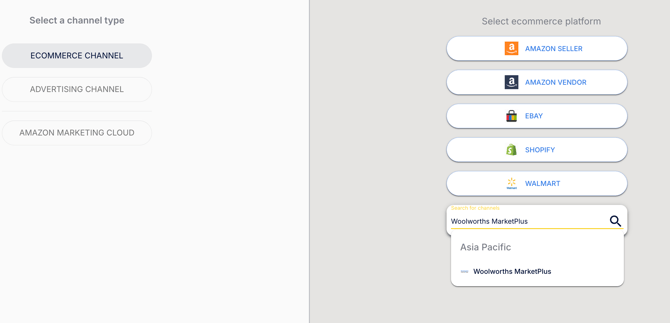
4. Click "Add Store" from the main menu, then click on "Search for marketplaces". Type "Woolworths MarketPlus" and click the result.
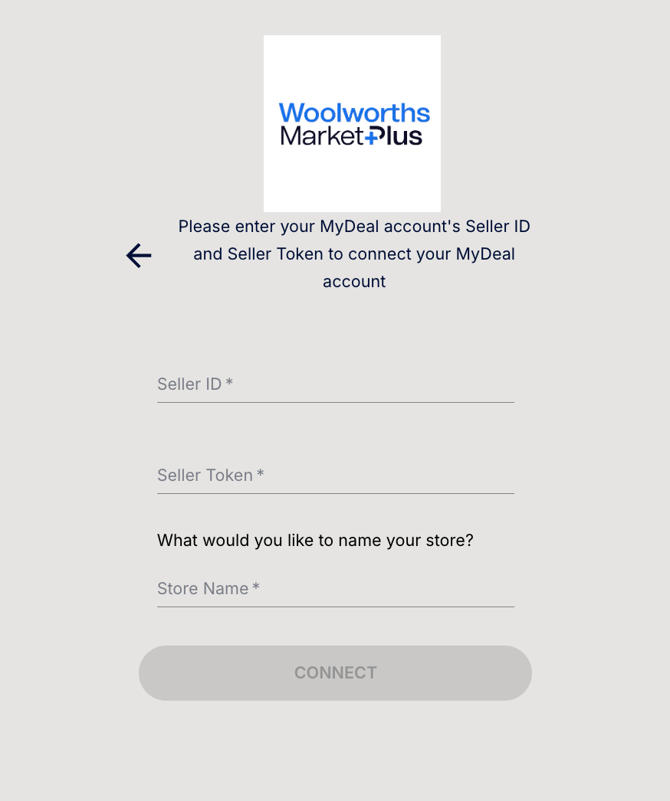
5. Input your Woolworths MarketPlus Seller ID, Seller Token, and the name you would like to set for your Woolworths MarketPlus store within the Marketplace Manager. Click the "Connect" button.
6. After this screen, your Woolworths MarketPlus store will be connected to MerchantSpring and will start syncing data. Congratulations!
If you need any help, just say hi in chat or email us. We’ll set up a screen share and do it with you. We're always happy to help!