![MS_Master_Horizontal_Reversed (1).png]](https://help.merchantspring.io/hs-fs/hubfs/MerchantSpring%20Logos/MS_Master_Horizontal_Reversed%20(1).png?height=30&name=MS_Master_Horizontal_Reversed%20(1).png)
Unlike Amazon Seller channels, which has a dedicated BuyBox report, BuyBox-related metrics for Amazon Vendor channels are already integrated into several existing reports and widgets in MerchantSpring.
You can find the available BuyBox-related data in the following reports and widgets:
-
Ordered Revenue Trend
- Access the Ordered Revenue Trend widget and select the relevant BuyBox-related metric from the dropdown menu.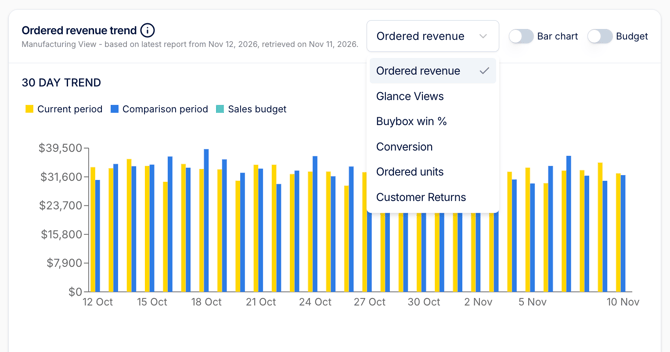
-
Ordered Revenue Summary
- View BuyBox-related metrics in the Ordered Revenue Summary widget for a consolidated overview of your ordered revenue performance.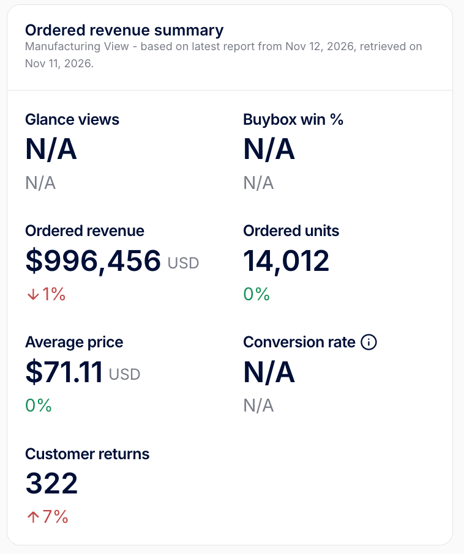
-
Ordered Revenue by Product
- BuyBox-related metrics are available in two places:- Report columns: Select the relevant metrics from the available report columns.
- Collapsible chart by product: Expand the chart to view the corresponding product-level data.
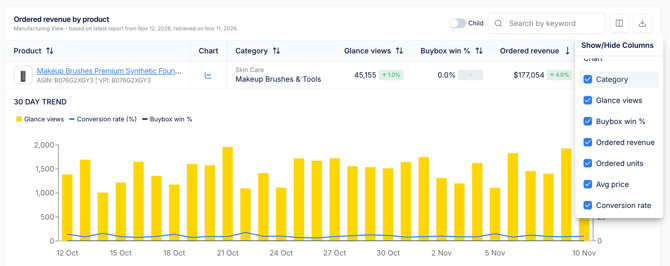
-
Retail Analytics by Product
- Navigate to the Retail Analytics by Product report to access BuyBox-related data at the product level. -
Revenue by Period
- The Revenue by Period report also includes BuyBox-related metrics, allowing you to review the data across different reporting periods.